
What are the STATUS and LOGS columns
Introduction
Section titled “Introduction”This article explains how BetterMerge records campaign activity in your Google Sheets, helping you track email statuses and engagement.
How Status & Logs Work
Section titled “How Status & Logs Work”- When a campaign starts, two new columns are added to the sheet:
- STATUS (Campaign Name) – Shows the current state of each email (e.g., SENT, OPENED, CLICKED, SKIPPED).
- LOGS (Campaign Name) – Records timestamps of email activity, including when an email was sent, opened, or a link was clicked.
Example
Section titled “Example”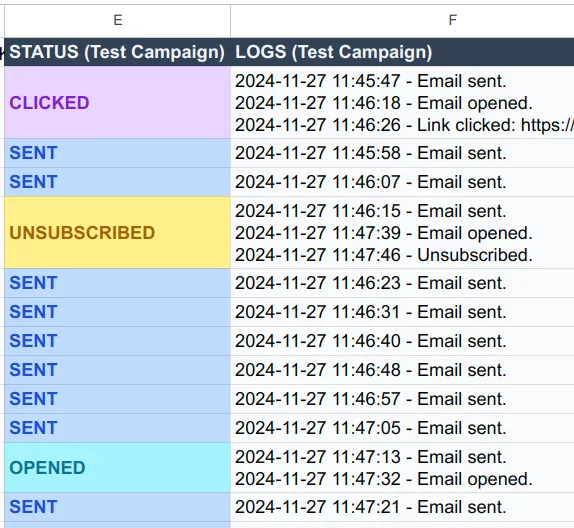
Best Practices
Section titled “Best Practices”- Avoid renaming or deleting status/logs columns while a campaign is running.
- Use filters to quickly analyze campaign performance once the campaign is completed.
Next, learn about segmenting contacts to send targeted emails.
New to BetterMerge?Start free — 50 emails/day, no credit card. Questions? Contact support.
BetterMerge is an independent product not affiliated with, endorsed by, or connected to Google LLC. Gmail, Google Sheets, Google Workspace, and Google Workspace Marketplace are trademarks of Google LLC.