Changelog

New features, improvements, and fixes in the BetterMerge web app and Google Sheets add-on.

  1. October 2026

    AI Assistant in every plan, random email delays, and campaign drafts that save themselves

    New

    • AI Assistant. Write a template from a short instruction, or rewrite the subject, preview text, or body you already have. One-click options make a draft shorter, friendlier, or more persuasive, or fix its grammar. You can try again, switch between versions, and undo back to your original. Every plan includes monthly AI credits. How it works
    • Spam check. Check a template for spam risks from the editor or from a campaign’s Summary tab. If something is flagged, Fix with AI rewrites the draft using those findings.
    • Write in your style. On the Pro plan, the higher-quality AI option learns your voice from up to three of your earlier emails. BetterMerge picks well-performing emails automatically, or you can choose them in Settings → AI.
    • Random delay between emails. Choose Random range under Delay between emails, and each email waits a random number of seconds between the minimum and maximum you set, such as 30–90 seconds. The estimate before you start shows a range of days. How it works
    • Edit delivery after a campaign starts. Change the daily limit, delay, sending days, or sending hours of a scheduled, running, or paused campaign with Edit delivery on its report or in the campaigns list. Changes apply from the next scheduled email.
    • Test emails. Send any row of your sheet to yourself from the Preview tab before you start. Test emails aren’t tracked and don’t count in your campaign stats.
    • Campaign drafts save themselves. Changes are saved a moment after you stop typing, and Ctrl/⌘+S saves straight away. If you leave the editor before a change is saved, BetterMerge saves it first. If it can’t, you can stay on the page, or restore your edits the next time you open the campaign.
    • Status counts and bulk delete. The campaign status tabs show how many campaigns each one holds, and you can select several drafts and delete them together.
    • Keyboard shortcuts. Press ? to see them all. / jumps to search, and g followed by a letter opens a page.

    Improvements

    • The start dialog lists anything still missing, with a link to fix it, and shows tracking and how long sending will take. Merge tags that don’t match a sheet column, and an empty subject line, are flagged before you start.
    • Daily sending limits are explained on the Dashboard, the Usage page, the campaign Summary, and the start dialog, based on what you’ve already sent today. On the Free plan, a campaign pauses when it reaches the daily limit and continues when you resume it.
    • Contacts show subscription and deliverability separately, so an unsubscribe and a bounce are tracked independently. You can filter contacts by sendable, subscribed, unsubscribed, or bounced.
    • The Google Sheet picker lists recent sheets and sheets shared with you, and the email column is picked for you.
    • In the template editor, the AI Assistant and the merge tag tools share one Tools bar. The merge tag check selects the first tab of your sheet and shows its result right there.
    • Upgrade prompts name the plan that includes a feature, and its price.
    • “View in Gmail” in the delivery logs opens the account that sent the email.

    Fixes

    • Dialogs in the Google Sheets add-on now scroll on short screens, so buttons like Start campaign and Cancel are always reachable.
    • Pages hold their layout while loading, and the Dashboard no longer flashes an empty state before your data appears.
  2. September 2026

    Open and click tracking on the Free plan, and a refreshed app

    New

    • Open and click tracking on the Free plan. Every plan can now see who opened each email and which links they clicked. Engagement-based follow-ups remain on paid plans.
    • A refreshed web app and add-on. The Dashboard shows your sending, opens, clicks, and unsubscribes at a glance, next to your recent campaigns. Campaigns, Templates, Contacts, and Snippets share one list layout with search, and reports, logs, and confirmations are easier to read.
    • What’s new in the app. New releases now appear inside the web app and the add-on, so you don’t have to come here to find out what changed.
    • Snippet search. Search your snippets from the Snippets page.

    Improvements

    • Plans and prices were updated. See pricing for the current plans. If you already subscribe, your price stays the same unless you change your plan.
    • Team plans can add up to 10 seats from the Subscriptions page. For a larger team, write to support@bettermerge.com.
    • Template autosave is more reliable when you edit quickly or switch between versions.
  3. August 2026

    Campaigns lock their template version, and reports count unique engagement

    New

    • Locked template versions. When a campaign starts, it keeps the exact version of the template it was started with. Editing the template afterwards doesn’t change emails that are already on their way, and the campaign report shows the version that was sent, with a preview. Your email signature is still added at send time, so signature updates apply.
    • Merge tag check before you start. BetterMerge compares the merge tags in your subject, preview text, and body with the columns in your sheet before a campaign starts, and lists any that don’t match.
    • Edit a scheduled campaign. Choose Unschedule and edit to move a scheduled campaign back to draft, change it, and schedule it again. The send time you picked is kept.

    Improvements

    • Campaign reports now count unique opens and clicks: each recipient counts once, however often they open or click. The tracking log still lists every interaction.
    • Opens and clicks are recorded more reliably.
  4. June & July 2026

    Email signatures, template version history, and reply-based follow-ups

    New

    • Email signatures. Add your signature to your emails so every message looks like one you wrote yourself. Set up a signature
    • Template autosave and version history. Templates save as you type, and a new version is kept every few minutes while you edit. Open the history to preview an earlier version, then restore it or go back to the current one.
    • Reply-based follow-ups. Segmentation rules can target people who replied to an earlier campaign, or who didn’t. This uses reply detection from the optional mailbox features, available on the Plus and Pro plans.
    • A better templates list. Search your templates, see how many campaigns use each one, and duplicate a template in one click.

    Improvements

    • The campaign editor’s template picker lists every template, with search, instead of only the ten most recently edited.
    • The campaign editor has clearer tabs (General, Recipients, Template, Delivery, Preview, and Summary) and a sender picker that groups your accounts and Gmail aliases.
    • The campaign editor warns you about unsaved changes, and a campaign can’t be started from an older saved copy while you have unsaved edits.
    • If a template is open in two places at once, a save from one no longer silently overwrites changes made in the other.
    • Bounce detection recognizes more kinds of bounce messages.
  5. April & May 2026

    Contacts, multiple senders, and a new Subscriptions page

    New

    • Contacts. A Contacts page lists everyone you have emailed. Open a contact to see their campaigns, activity, and whether they are subscribed, unsubscribed, or bounced. Manage contacts
    • Multiple senders. Send campaigns from your Gmail aliases or from additional Google accounts. Plus includes 3 senders and Pro includes 5. Senders and aliases
    • Subscriptions page. Upgrade, change billing, and manage team seats in one place, with prices shown in your currency.

    Improvements

    • The Free plan includes 5 campaigns a month, and the app tells you when you reach the limit.
    • Returning to a campaign from the template editor saves the template first, so the campaign picks up your latest changes.
  6. July 2025

    Easier Sign-in, Automatic Sheet Selection, Layout Customization and Quick Feedback

    July 2025 Release

    We are happy to share BetterMerge’s July 2025 update. This release brings better user-experience, smarter features, and improvements based on your feedback to make managing email campaigns simpler and faster.

    🚀 New Features & Enhancements

    • Simplified Sign-in Process - We’ve simplified the login process for both the Google Sheets add-on and web app. Now, you only need to grant permissions once, saving time and effort.

    • Auto-Select Active Sheet in Templates - The template editor now automatically picks your active Google Sheet and fills in merge tags, so you don’t have to select it manually.

    • Auto-Select Active Google Sheet in Campaigns - The campaign editor also detects your active Google Sheet, reducing extra steps.

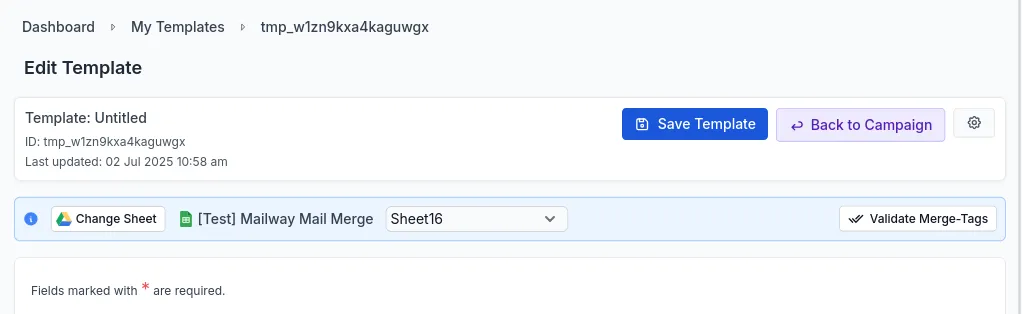
    • Back Button Navigation - Added a back button to return to the campaign editor after creating a template.

      Back button in template editor

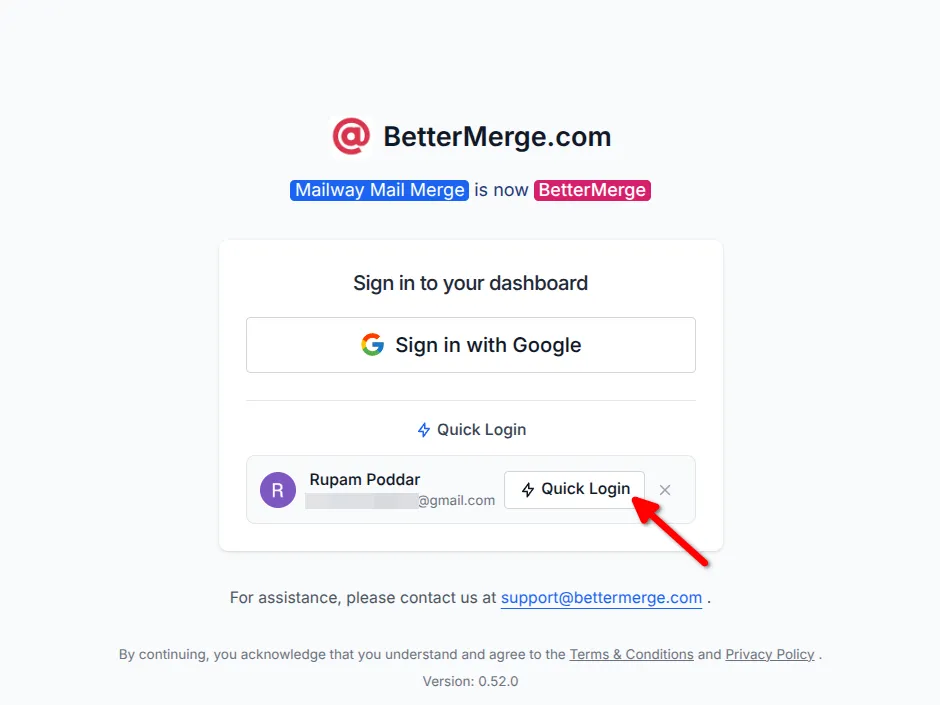
    • Quick Login for Returning Users - The web app now lets you log in with one click, making it faster to get back to work.

      Quick login screenshot

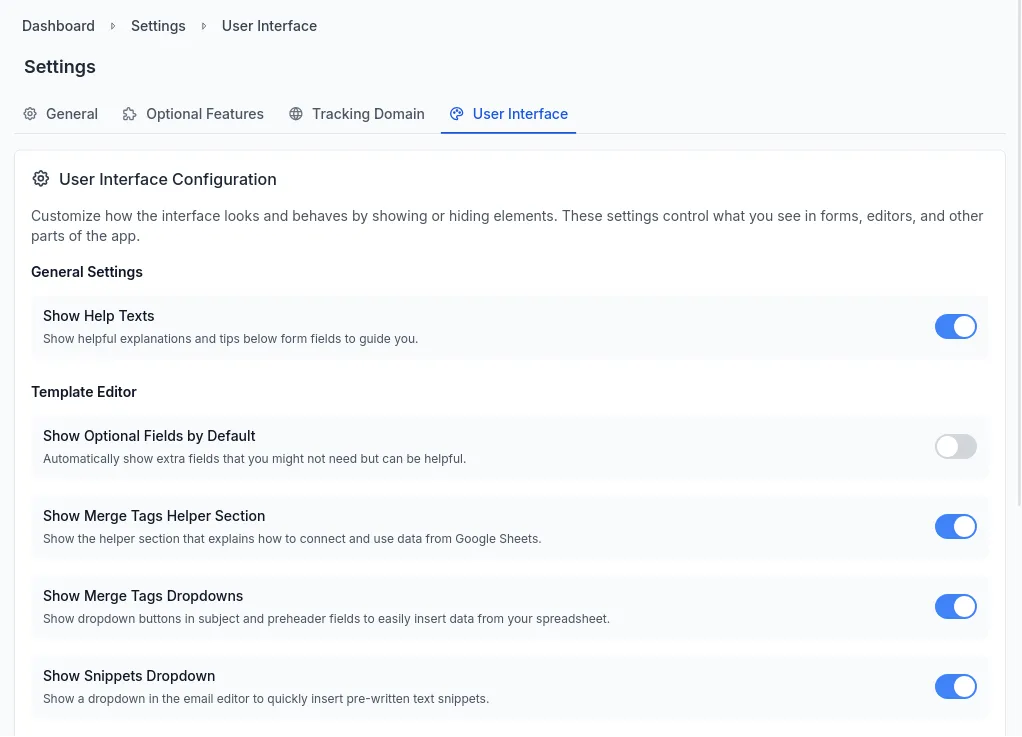
    • Global Settings & User Configuration - A new settings page lets you customize your experience, like turning off help texts to declutter the interface.

      Settings page screenshot

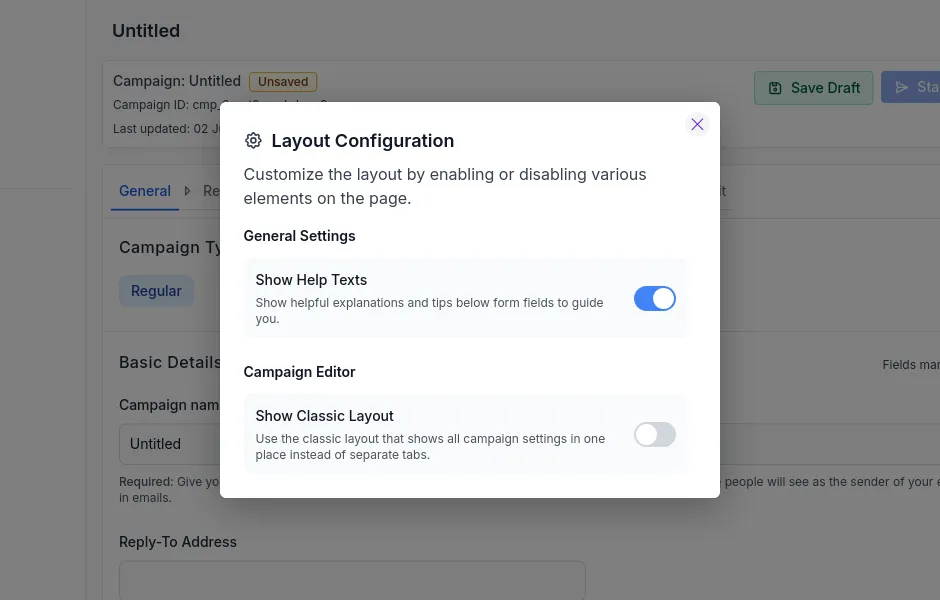
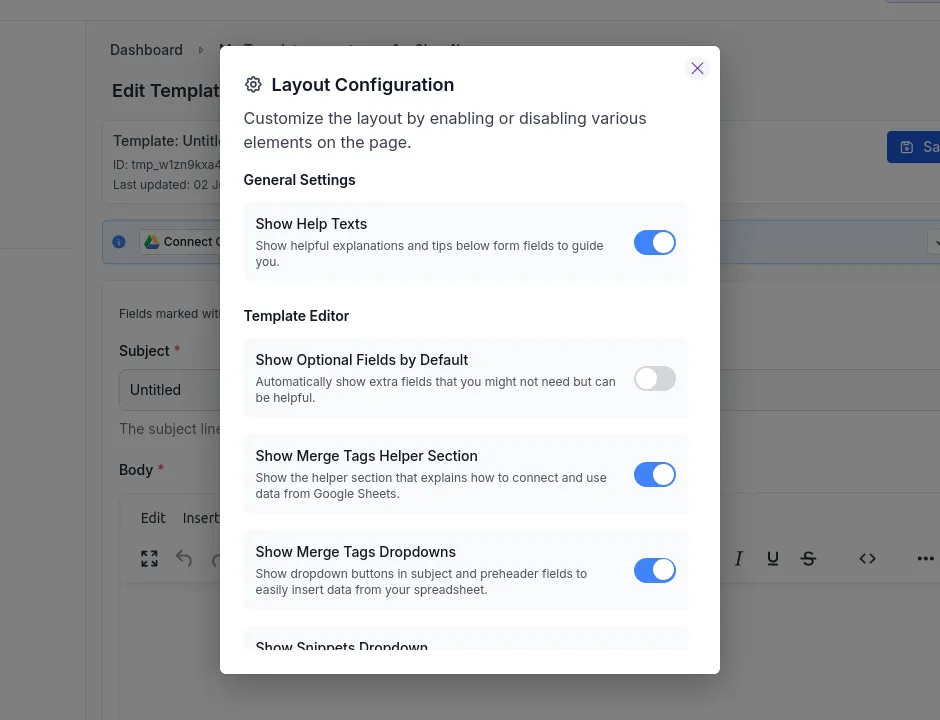
    • Quick UI Settings in Editors - In addition to the standalone settings page, you can now access a settings dialog directly within both the campaign editor and template editor pages. This allows you to quickly adjust UI preferences without leaving your current workflow.

      Settings dialog in campaign editor Settings dialog in template editor

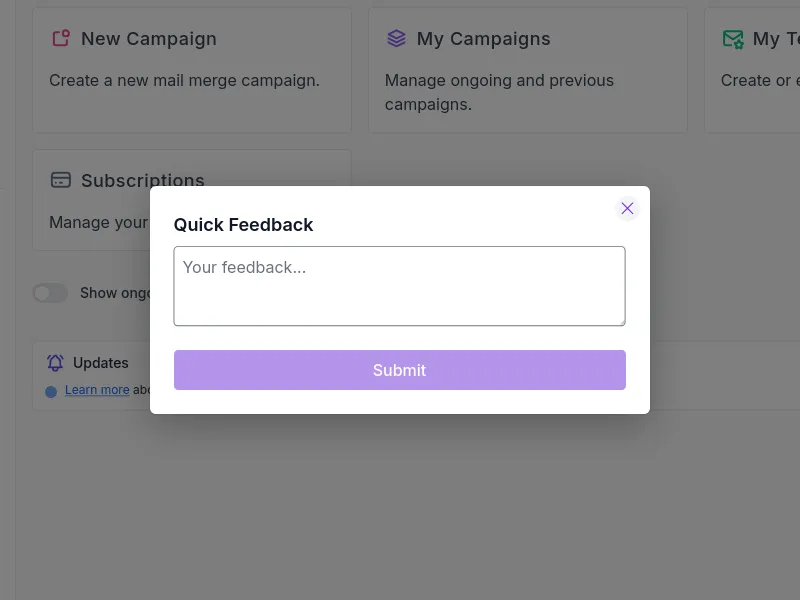
    • Quick Feedback Form - Added a feedback button in the navbar that opens a simple form to share your thoughts directly with us.

      Quick feedback form screenshot

    🎯 Improvements

    • Combined the two-step authentication process into one step for both the add-on and web app.
    • Made template creation easier with automatic sheet detection.
    • Improved navigation between campaign and template editors.
    • Added options to make logging in and customizing the interface simpler.

    We hope these updates make BetterMerge easier and more enjoyable to use. Your feedback helps us improve, so keep sharing your thoughts with us! If you have any questions or need assistance, feel free to reach out to us at support@bettermerge.com.

  7. January 2025

    Automatic Email Validation, Bounce Detection, Snippets, and More!

    January 2025 Release

    We’re thrilled to share the latest updates in BetterMerge’s January 2025 release. This update introduces powerful new features, enhancements, and bug fixes to help you work smarter and faster.

    🍿 New Features & Enhancements

    • Introduced Bounce Protection, featuring automatic email validation.
    • Added support for custom tracking domains.
    • Implemented bounce tracking to identify which emails were undelivered.
    • Introduced Snippets, allowing reusable HTML components for templates.
    • Launched a new Premium subscription plan with additional features.
    • Added subscription and team management pages for better control.
    • Introduced tabs to filter and view campaigns by state.
    • Added an option to receive campaign reports via email.
    • Enabled campaign duplication with a single click.
    • Added a progress bar to the campaign report page for better visibility.
    • Updated the dashboard to show ongoing campaigns.
    • Added inline help for all fields on the template editor page.
    • Introduced a loading indicator for the login button.
    • Enabled auto-saving when creating a new template in the campaign editor.
    • Improved the layout and usability of the template editor page.
    • Enhanced the subscriptions page to display detailed plan features.
    • Optimized page load times for faster navigation.
    • Refreshed the overall user interface (UI) for a cleaner look.

    🐞 Bug Fixes

    • Resolved issues with pagination across all tables.
    • Fixed table overflow problems on several pages.
    • Addressed cases where Pause and Stop buttons were not visible.
    • Fixed an issue with the Contact Us form not functioning correctly.

    We hope these updates enhance your experience with BetterMerge and make managing your email campaigns even more seamless. As always, we’re committed to improving and look forward to your feedback. Stay tuned for more updates!