
Add Preview Text
Introduction
Section titled “Introduction”Preview text (also known as preheader text) is the short snippet that appears next to or below the subject line in email inboxes. It provides recipients with a quick summary of the email content, influencing open rates and engagement. In BetterMerge, you can add preview text while composing your email template.
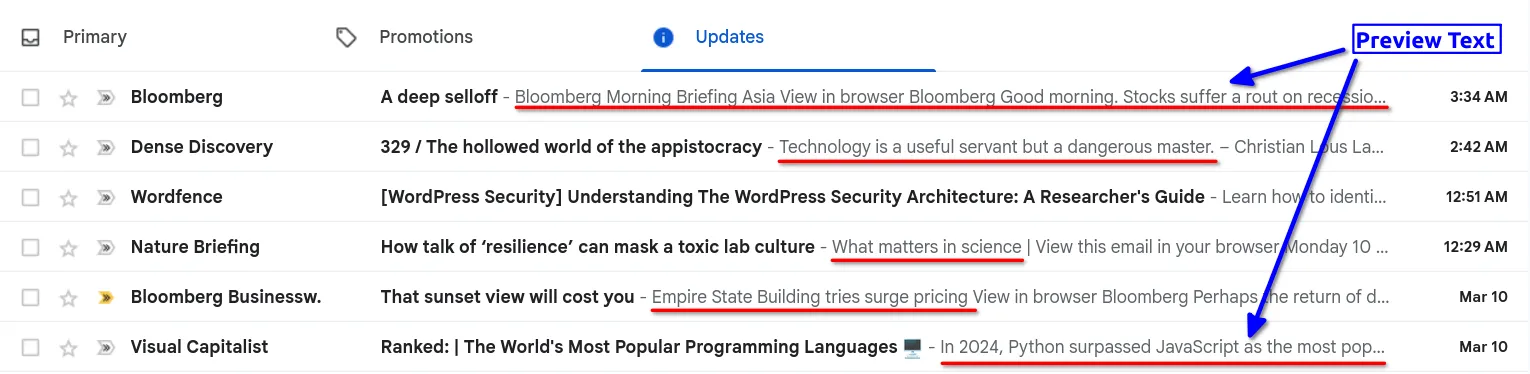
Why Preview Text Matters
Section titled “Why Preview Text Matters”- Improves Open Rates: A compelling preview can entice recipients to open your email.
- Provides Context: It acts as an extension of the subject line, summarizing the email.
- Prevents Unwanted Previews: Without it, email clients may display random text from the email body, which may not be ideal.
How to Add Preview Text in BetterMerge
Section titled “How to Add Preview Text in BetterMerge”Follow these steps to add preview text to your email templates in BetterMerge.
Step 1: Open the Template Editor
Section titled “Step 1: Open the Template Editor”Create a new template or open an existing one. You can do this from Templates in the left menu, or from the Template tab of a campaign. See Create an email template.
Step 2: Show the Optional Fields
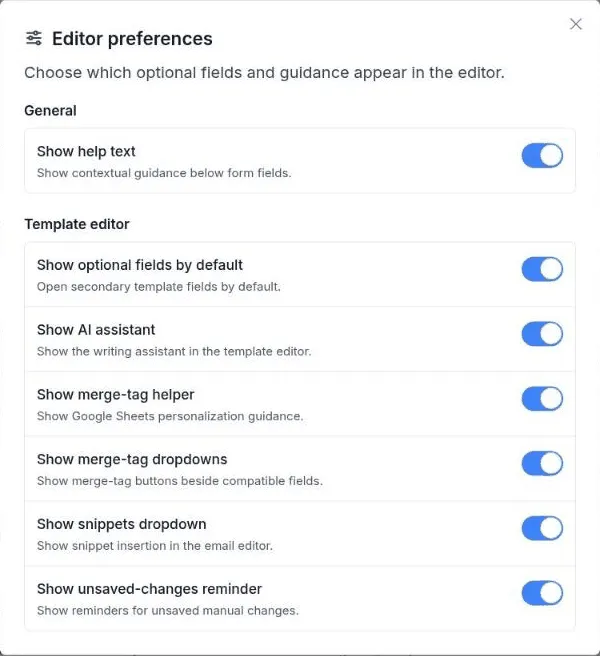
Section titled “Step 2: Show the Optional Fields”The Preview text field is an optional field, so it stays hidden until you turn optional fields on:
- Click Preferences in the template header. The Editor preferences window opens.
- Turn on Show optional fields by default, then close the window.
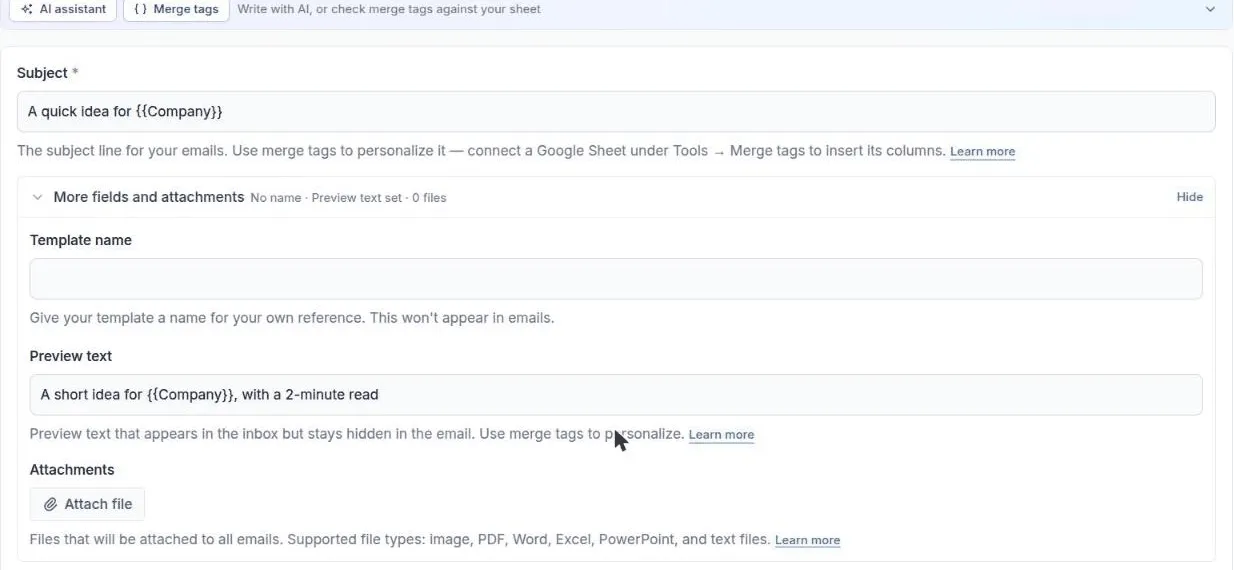
- Below the body, open More fields and attachments. The Preview text field is listed there. Its summary shows Preview text set or No preview text.
You only need to do this once. The setting stays on for your account.
Step 3: Fill in the Preview Text Field
Section titled “Step 3: Fill in the Preview Text Field”Type the preview text for your email. You can use Merge tags to personalize it, for example A quick idea for {{Company}}.
Step 4: Let It Save
Section titled “Step 4: Let It Save”There is nothing to click. Templates save automatically a moment after you stop typing, and the header shows Saved automatically when your changes are stored. When you are done, click Back to campaign if you came from a campaign.
Best Practices for Preview Text
Section titled “Best Practices for Preview Text”- Keep it Short: Most email clients display only 35-90 characters.
- Complement the Subject Line: Avoid repeating the subject; instead, add context.
- Create Urgency or Curiosity: Encourage the recipient to open the email.
- Avoid Empty or Irrelevant Text: Some clients auto-pull content if the field is blank.
Conclusion
Section titled “Conclusion”Preview text enhances email visibility and engagement by providing a concise preview of your message. In BetterMerge, enabling and customizing preview text is quick and easy. Use it effectively to maximize email open rates and ensure a professional appearance in inboxes.
New to BetterMerge?Start free — 50 emails/day, no credit card. Questions? Contact support.
BetterMerge is an independent product not affiliated with, endorsed by, or connected to Google LLC. Gmail, Google Sheets, Google Workspace, and Google Workspace Marketplace are trademarks of Google LLC.